Chapter 2: Relational Model
1. The Introduction of relational model
a brief conclusion
a brief conclusion
- The relational model is very simple and elegant.
- A relational database is a collection of one or more relations, which are based on relational model.
- A relation is a table with rows and columns.
- The major advantages of the relational model are its simple data representation and the ease with which even complex queries can be expressed.
- Owing to the great language SQL, the most widely used language for creating, manipulating, and querying relational database.
an example of Relation
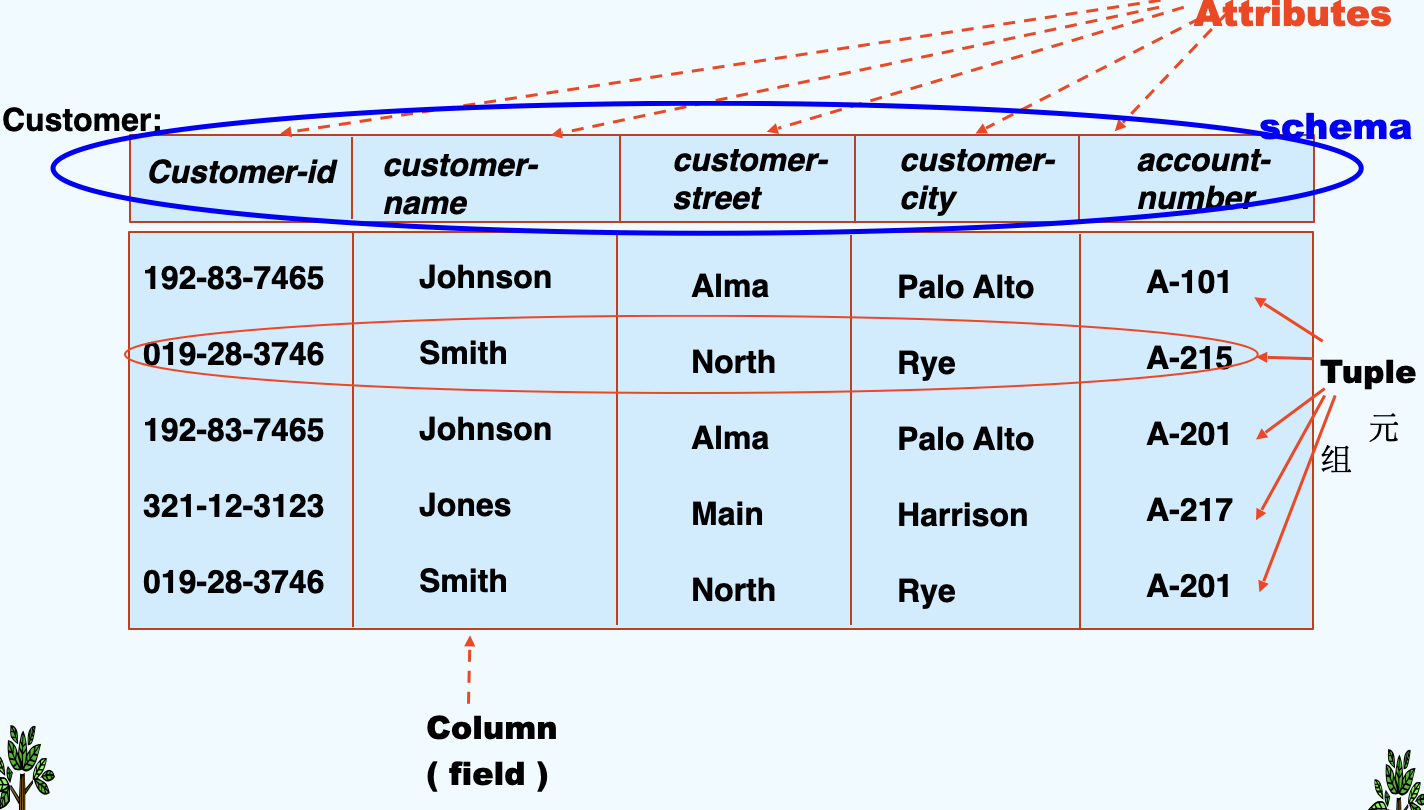
distinguish
- A relationship: an association among several entities.
- A relation: is the mathematical concept, referred to a table
2. Basic Structure
definition
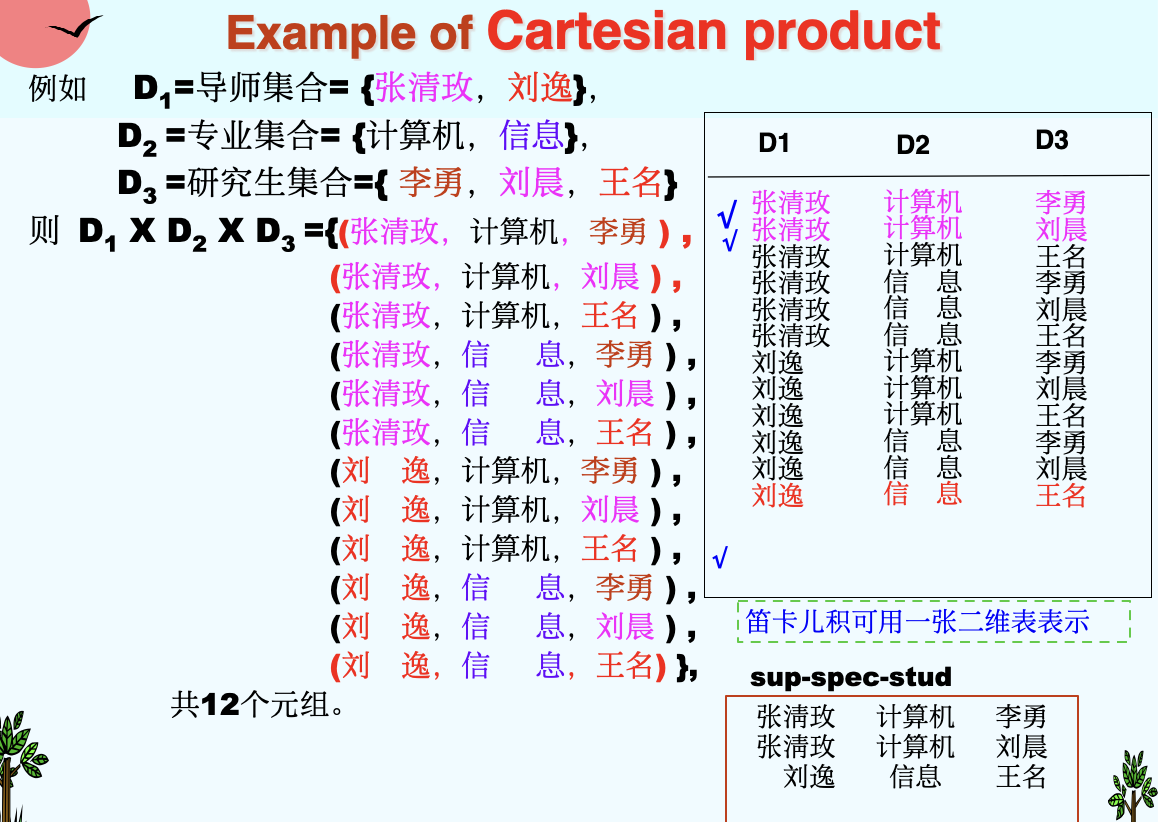
- Formally, given sets \(D_1, D_2, ..., D_n\), \(D_i = a_{ij}|_{j=1...k}\)
- a relation r is a subset of \(D_1 \times D_2 \times ... \times D_n\)
-
a Cartesian product of a list of domain \(D_i\)
-
Thus a relation is a set of n-tuples(\(a_{ij}, a_{2j}, ..., a_{nj}\))
An Example of Cartesian product
(1)Attribute Types
- Each attribute of a relation has a name.
- The set of allowed values for each attribute is called the domain (域) of the attribute.
- Attribute values are (normally) required to be atomic, that is, indivisible. (1st NF, 第一范式)
- E.g. multivalued attribute values are not atomic
- E.g. composite attribute values are not atomic
- The special value null is a member of every domain.
- The null value causes complications in the definition of many operations.
- we shall ignore the effect of null values for the moment and consider their effect later.
(2)Concepts about relation
- A Relation is concerned with two concepts : relation schema and relation instance.
- The relation schema describe the structure of the relation.
- The relation instance corresponds to the snapshot of the data in the relation at a given instant in time.
- C.f.: Database schema and database instance.
example of relation schema
- Instructor-schema = (ID: string, name: string, dept_name: string, salary: int)
- Instructor-schema = (ID, name, dept_name, salary)
an one-to-one correspondence
- variable <-> relation
- variable type <-> relation schema
- variable value <-> relation instance
(2-a) Relation Schema
- \(A_1, A_2, ..., A_n\) are attributes
- Formally expressed:
- \(R = (A_1, A_2, ..., A_n)\) is a relation schema
- E.g. Instructor-schema = (ID, name, dept_name, salary)
- \(r(R)\) is a relation on the relation schema R
(2-b) Relation Instance
- The current values (relation instance) of a relation are specified by a table.
- An element t of r is a tuple, represented by a row in a table.
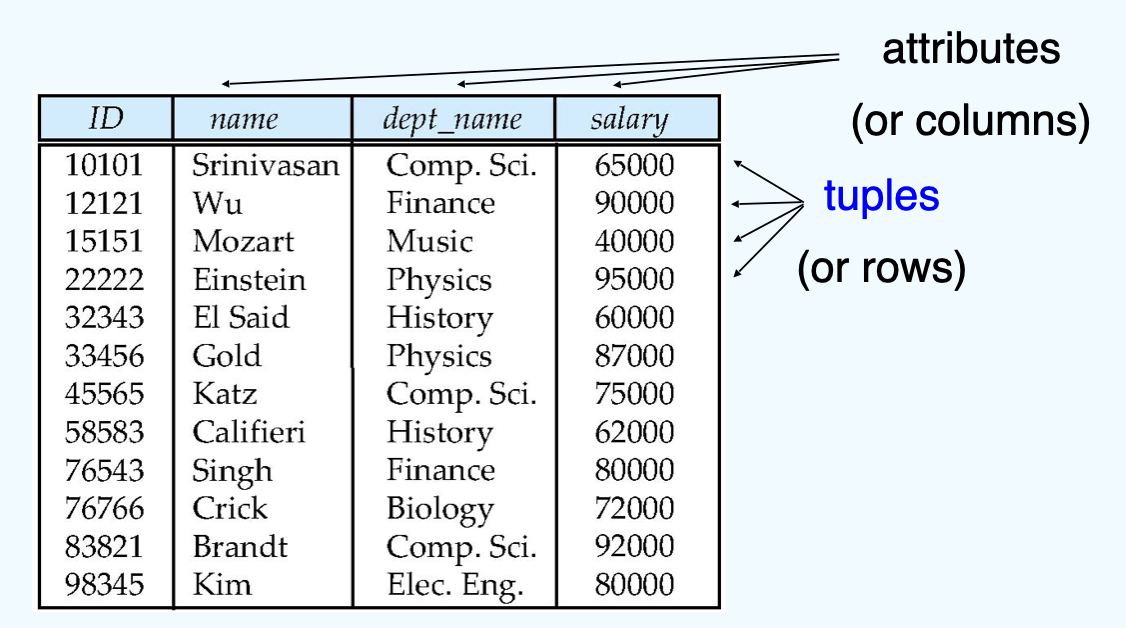
- Let a tuple variable t stands for a tuple. Then t[name] denotes the value of t on the name attribute.
(3) Relations are Unordered
- Order of tuples is irrelevant (tuples may be stored in an arbitrary order), and tuples in a relation are no duplicate(完全一样的).
- E.g. department(dep_name, building, budget) relation with unordered tuples.
(4) Keys(码、键)
- Let \(K \subseteq R\)
- K is a superkey(超码) of R if values for K are sufficient to identify a unique tuple of each possible relation r(R)
- Example: {instructor-ID, instructor-name} and {instructor-ID} are both superkeys of instructor.
- K is a candidate key(候选码) if K is minimal superkey.Example: {instructor-ID} is a candidate key for instructor, since it is a superkey, and no subset of it is a superkey.
- K is a primary key(主码), if k is a candidate key and been defined by user explicitly. Primary key is usually marked by underline.
(5) Foreign key(外键,外码)
- Assume there exists relation r and s: r(A, B, C), s(B, D), we can say that attribute B in relation r is foreign key referencing s, and r is a referencing relation(参照关系) , and s is a referenced relation(被参照关系).
an instance
- 学生(学号,姓名,性别,^^专业号^^,年龄) - 参照关系
- 专业(^^专业号^^,专业名称) - 被参照关系 (目标关系)
- 其中属性专业号称为关系学生的外码。
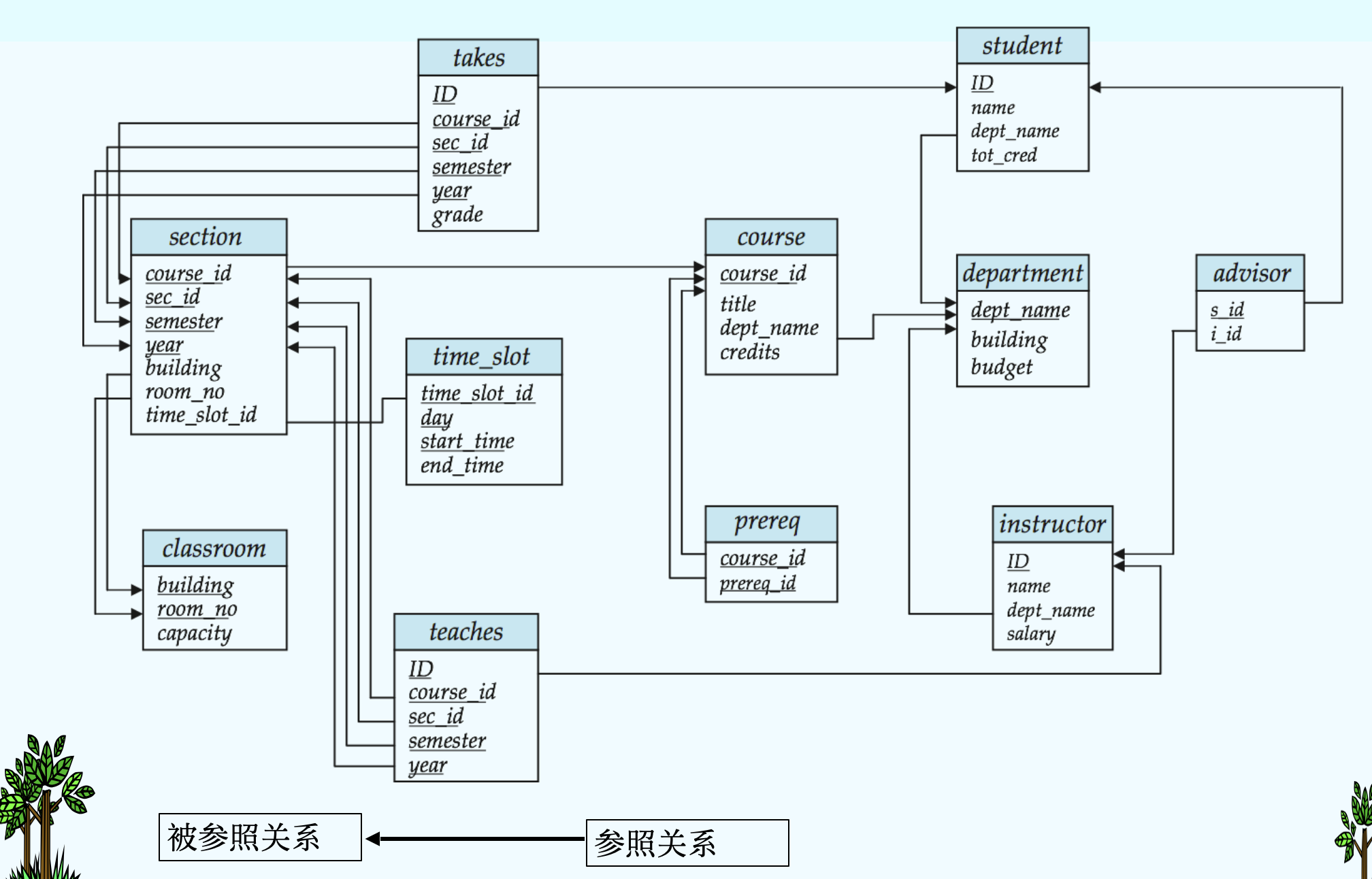
(6) Schema of the University Database
- classroom(building,room_number,capacity)
- department(dept_name,building,budget)
- course(course_id,title,dept_name,credits)
- instructor(ID,name,dept_name,salary)
- section(course_id,sec_id,semester,year,building,room_number,time_slot_id)
- teaches(ID,course_id,sec_id,semester,year)
- student(ID,name,dept_name,tot_cred)
- takes(ID,course_id,sec_id,semester,year,grade)
- advisor(s_ID,i_ID)
- time_slot(time_slot_id,day,start_time,end_time)
- prereq(course_id,prereq_id)
(7)Query Languages
- Language in which user requests information from the database.
- “Pure” languages:
- Relational Algebra - the basis of SQL
- Tuple Relational Calculus (元组关系演算)
- Domain Relational Calculus - (域关系演算) QBE
- Pure languages form underlying basis of query languages that people use, e.g. SQL.
3. Relational Algebra
- Procedural language (in some extent).
- Six basic operators
- Select 选择
- Project 投影
- Union 并
- set difference 差(集合差)
- Cartesian product 笛卡儿积
- Rename 改名(重命名)
- The operators take one or two relations as inputs and give a new relation as a result.
- Additional operations
- Set intersection 交
- Natural join 自然连接
- Division 除
- Assignment 赋值
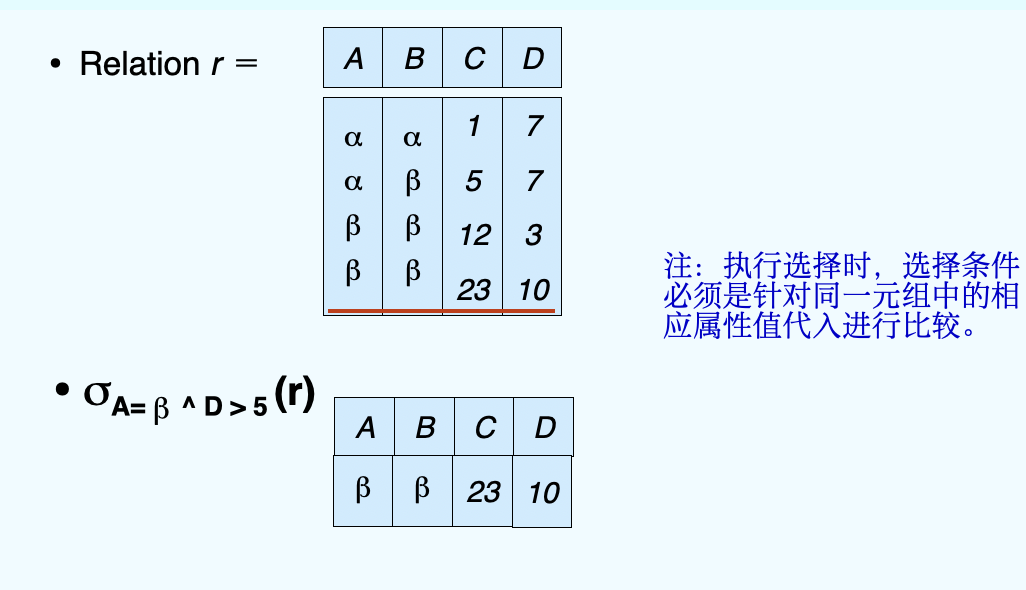
(1)Select Operation
- Notation: \(\sigma_p(r)\), \(\sigma\) is pronounced as sigma
- p is called the selection predicate
- Defined as: \(\sigma_p(r) = {t|t\in r and p(t)}\)
- Where p is a formula in propositional calculus consisting of terms connected by: ∧ (and), ∨ (or), ¬ (not)
- Each term is one of:
op or , where op is one of: =, ≠ , >, ≥ , < , ≤
- Example of selection: \(\sigma_{dept\_name='Finance'}(department)\)
Let's show an example below:
(2)Project Operation
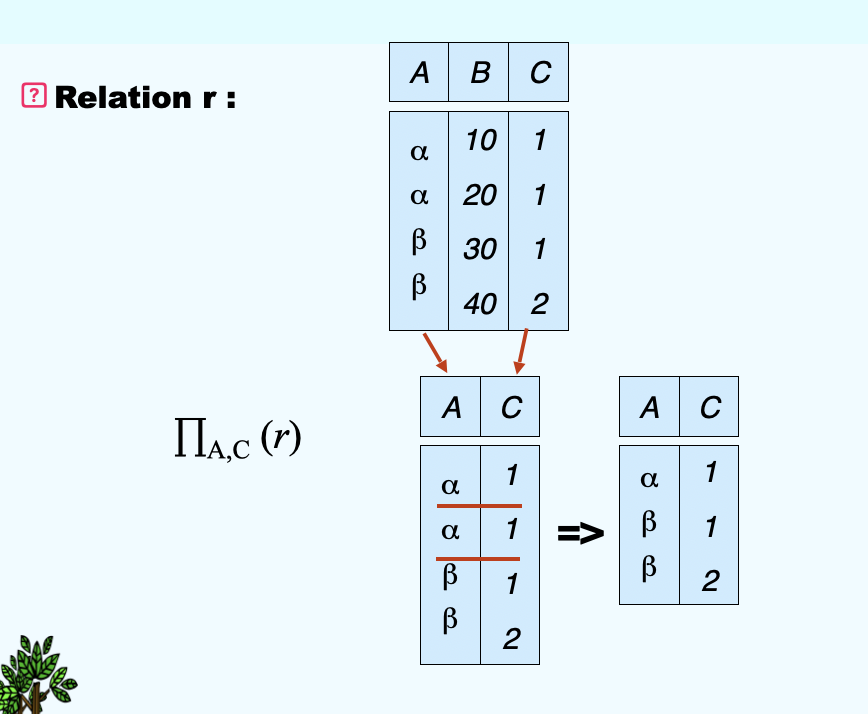
- Notation:\(\prod_{A1, A2, ... Ak}(r)\), \(\prod\)is pronounced as pi, where \(A_1, … A_k\) are attribute names and r is a relation name
- The result is defined as the relation of k columns obtained by erasing the columns that are not listed
- Duplicate rows removed from result, since relations are sets.
- E.g. To eliminate the building attribute of department, we can use: \(\prod_{building}(department)\)
(3)Union Operation
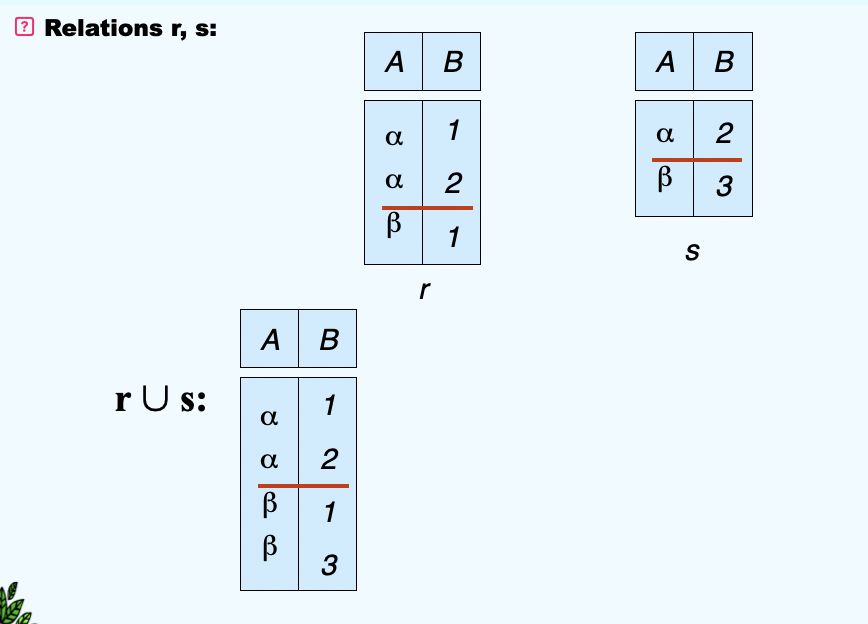
- Notation: \(r\cup s\)
- Defined as: \(r\cup s = {t|t\in r \; or \; t\in s}\)
- For \(r\cup s\) to be valid:
- r, s must have the same arity (same number of same attributes)
- The attribute domains must be compatible (e.g., 2nd column of r deals with the same type of values as does the 2nd column of s)
(4)Set Difference Operation
- Notation: \(r - s\)
- Defined as: \(r - s = \{t | t\in r \ \ {and} \ \ r \notin s\}\)
- Set differences must be taken between compatible relations.
- r and s must have the same arity
- attribute domains of r and s must be compatible
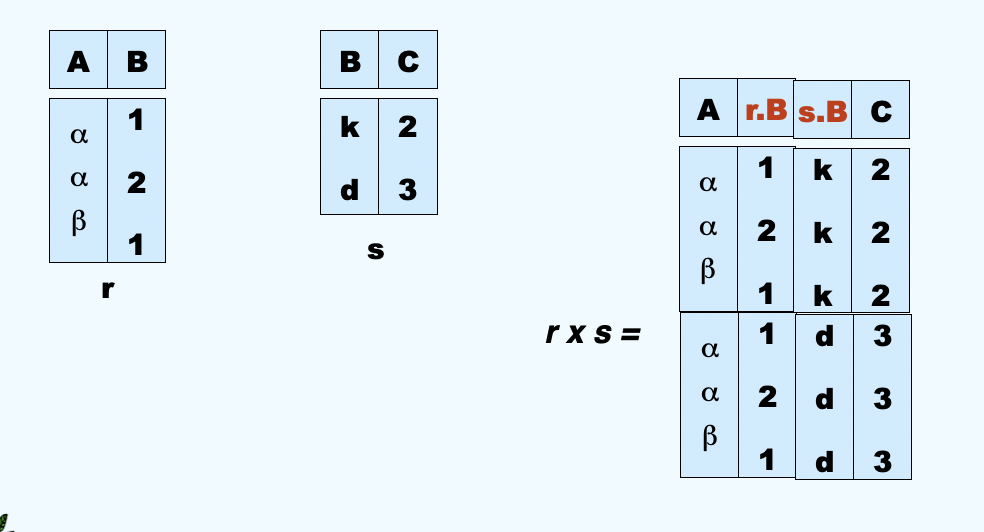
(5)Cartesian Product Operation(广义笛卡尔积)
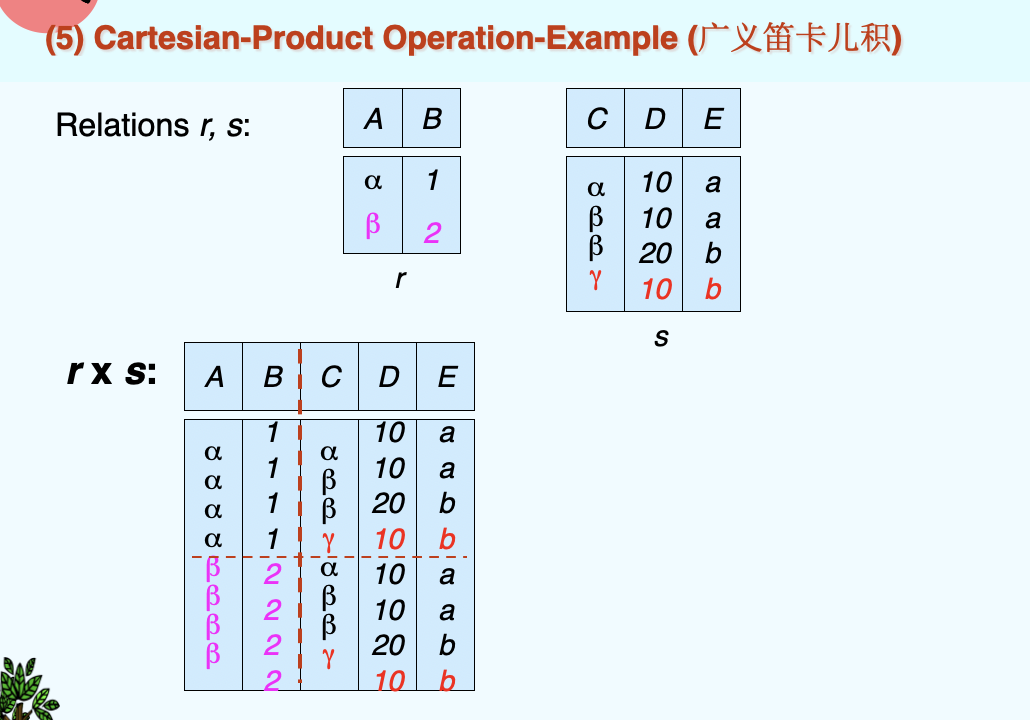
- Notation: \(r \times s\)
- Defined as: \(r \times s = \{ \{t \ q \}\ t \in r \ \ {and} \ \ q \in s\}\)
- Assume that attributes of r(R) and s(S) are disjoint. (That is, \(R \cap S = \emptyset\))
- If attributes of r(R) and s(S) are not disjoint, then renaming for attributes must be used.
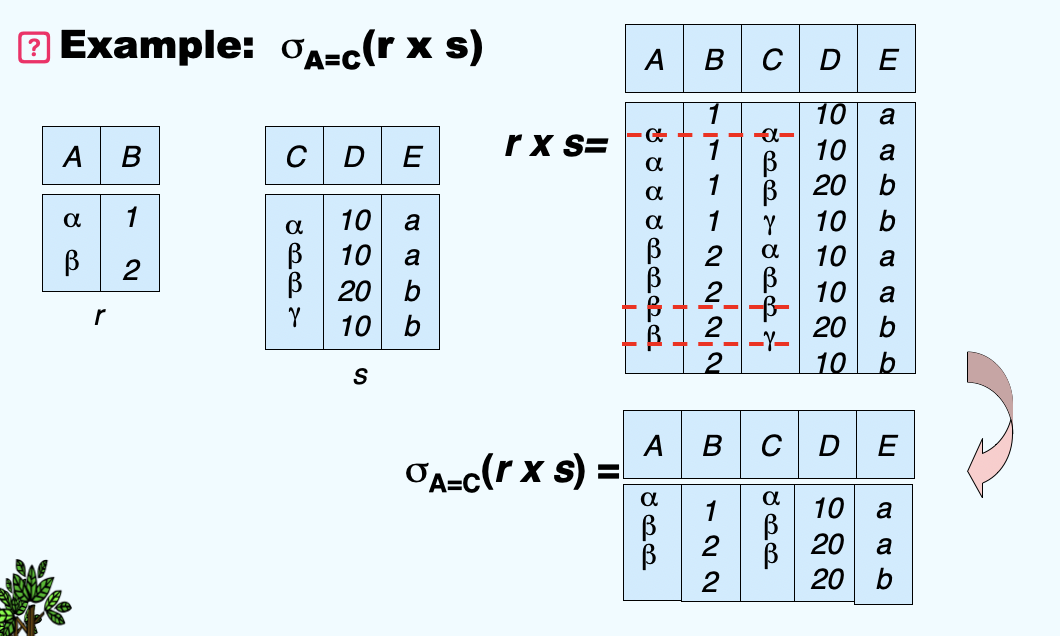
(6)Composition of Operation
- Can build expressions using multiple operations
(7)Rename Operation
- Allows us to name, and therefore to refer to, results of relational-algebra expressions.
- Allow us to refer to a relation by more than one name.
-
Then we can have two examples below:
- \(\rho_X(E)\), \(\rho\) is pronounced as rho returns the expression E under the name X
- If a relational-algebra expression E has arity n, then \(\rho_{X(A1, A2, ..., An)}(E)\) returns the result of expression E under the name X, and with the attributes renamed to \(A1, A2, ..., An\)
-
We have an example below:
Basic information:
branch (branch-name, branch-city, assets)
customer (customer-name, customer-street, customer-city)
account (account-number, branch-name, balance)
loan (loan-number, branch-name, amount)
depositor (customer-name, account-number)
borrower (customer-name, loan-number)
Queries:
Find the names of all customers who have a loan at the Perryridge branch.
Query1: \(\prod_{customer-name}(\sigma_{branch-name = "Perryridge"(\sigma_{borrower.loan-number = loan.loan-number}(borrow\times loan))})\)
Query2: \(\prod_{customer-name}(\sigma_{borrower.loan-number=loan.loan-number}(borrower\times (\sigma_{branch-name="Perryridge"}(loan))))\)
Above are two kinds of queries, which one is better?
The second is better: when it comes to \(\times\), the fewer tuples a relation has, the better it participates in the operation.
- 找最大/最小时,先作笛卡尔积,然后用总集减去其补集
below are some additional operations
(8)Set-Intersection Operation
- Notation: \(r \cap s\)
- Defined as: \(r \cap s = \{t|t\in r \ \ and \ \ t\in s\}\)
- Assume:
- r, s have the same arity
- attributes of r and s are compatible
- Note: \(r \cap s = r-(r-s)\)
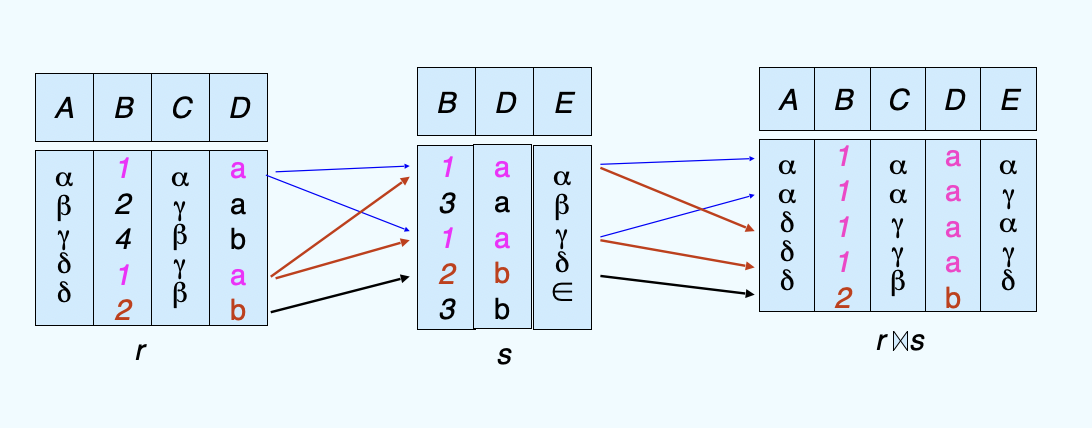
(9)Natural-Join Operation
- Notation: \(r ⋈ s\)
-
Example:
- R = (A,==B==,C,==D==); S = (E,==B==,==D==)
- Result schema of natural-join or r and s = (A, ==B==, C, ==D==, E);
- \(r ⋈ s = \prod_{r.A, r.B, r.C, r.D, s.E}(\sigma_{r.B = s.B \land r.D = s.D}(r \times s))\)
-
它和笛卡尔积的辨析:笛卡尔积对于不同relation中的同名attributes选择了换名都保留,但是这个是只取相同部分
- Theta join: \(r\ \mathop{\bowtie}\limits_{\theta}\ s = \sigma_{\theta}(r\times s)\)
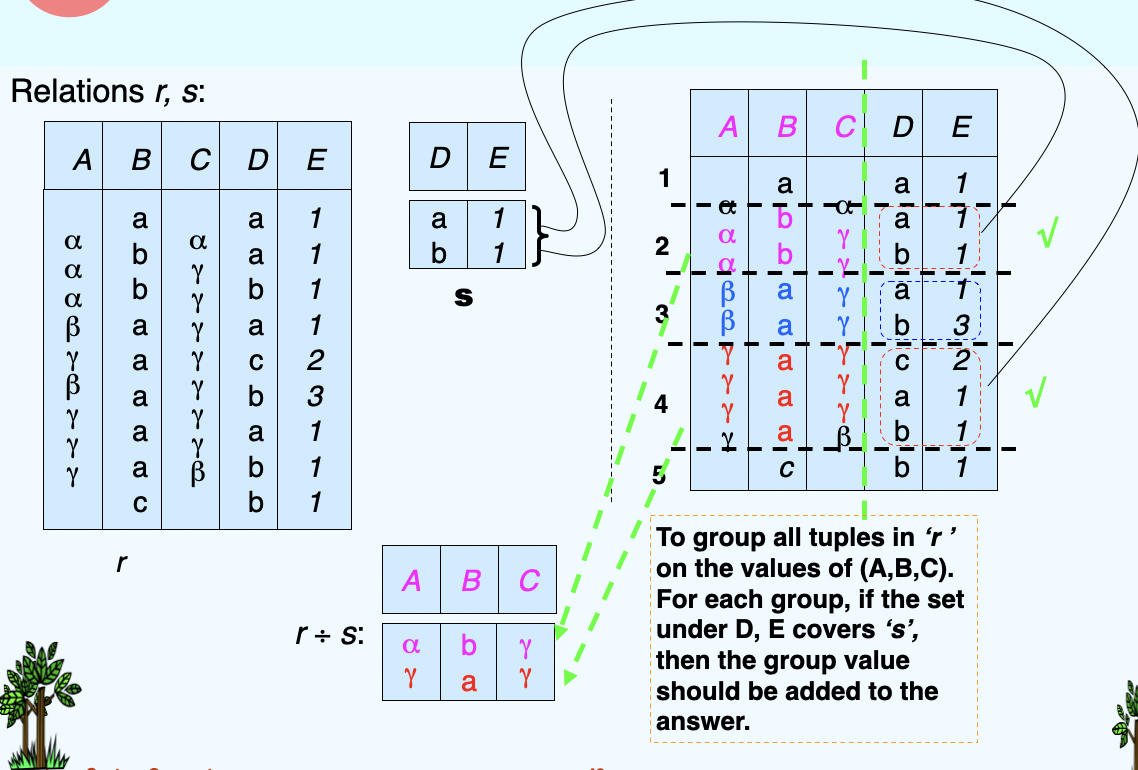
(10)Division Operation
- Let r and s be relations on schemas R and S respectively where
- R = (\(A_1\), ..., \(A_m\), \(B_1\), ..., \(B_n\))
- S = (\(B_1\), ..., \(B_n\))
- The result of \(r \div s\) is a relation on schema \(R-S = (A_1, ..., A_m)\)
- \(r \div s = \{t \ | \ t\in \prod_{R-S}(r) \ \land \ \forall u \in s (tu\in r)\}\)
(11)Assignment Operation
- The assignment operation (\(\leftarrow\)) provides a convenient way to express complex queries
- Write query as a sequential program consisting of a series of assignments, which is followed by an expression whose value is displayed as a result of the query.
- Assignment must always be made to a temporary relation variable
- Example: Write \(r\div s\) as:
- temp1 \(\leftarrow\) \(\prod_{R-S}(r)\)
- temp2 \(\leftarrow\) \(\prod_{R-S}((temp1\times s)-\prod_{R-S,S}(r))\)
4. Extended Relational-Algebra-Operations
(1)Generalized Projection
- Extends the projection operation by allowing arithmetic functions to be used in the projection list: \(\prod_{F1, F2, ..., Fn}(E)\)
- E is any relational-algebra expression
- Each of \(F_1, F_2, ..., F_n\) are arithmetic expressions involving constants and attributes in the schema of E.
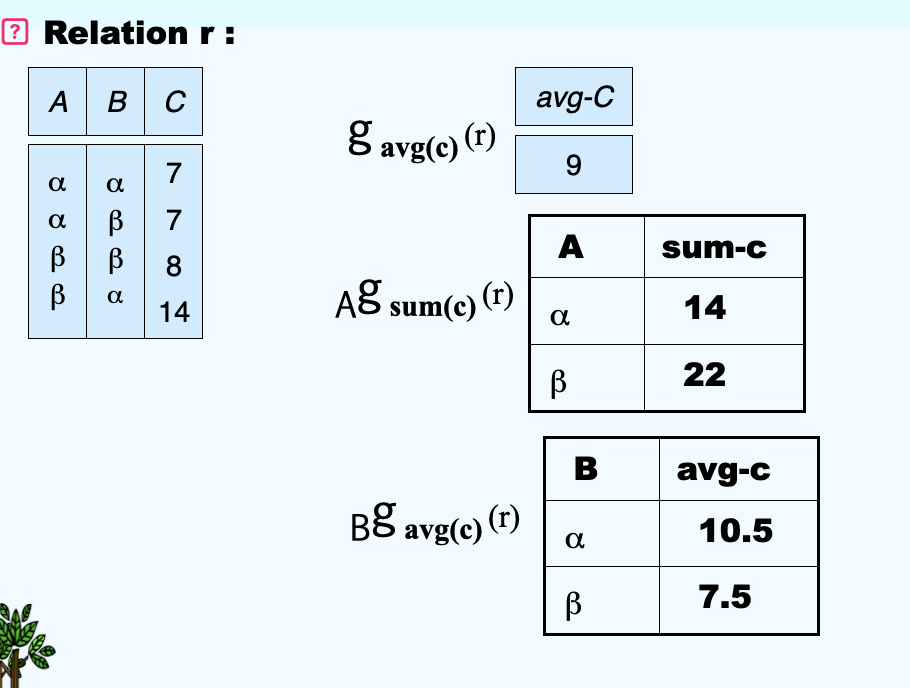
(2)Aggregate Functions and Operations
- Aggregation function takes a collection of values and returns a single value as a result.
- Aggregation operation in relational algebra: \(G_1, G_2, ..., G_n \ g \ F1(A1), F2(A2), ..., Fn(An)(E)\)
- \(E\) is any relational-algebra expression
- \(G_1, G_2, ..., G_n\) is a list of attributes on which to group(can be empty)
- Each \(F_i\) is an aggregate function
- Each \(A_i\) is an attribute name
An example:
(3)Outer Join
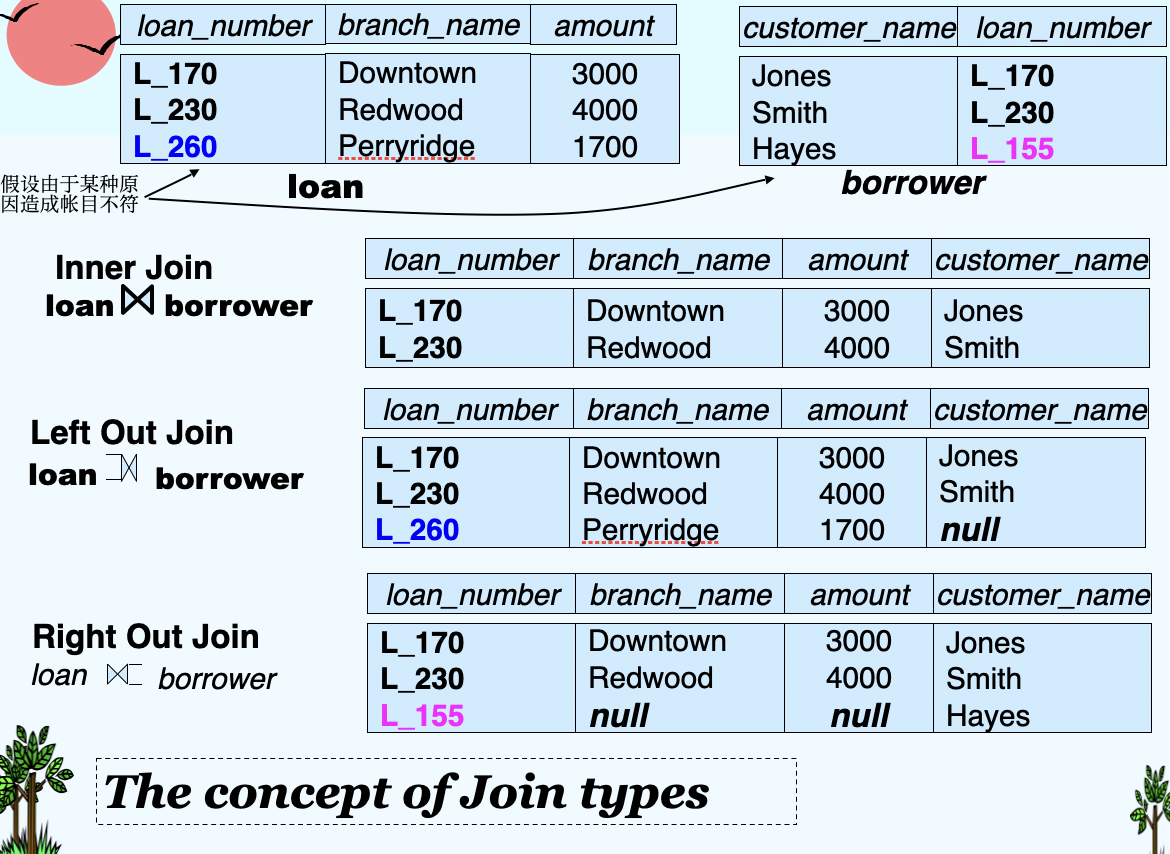
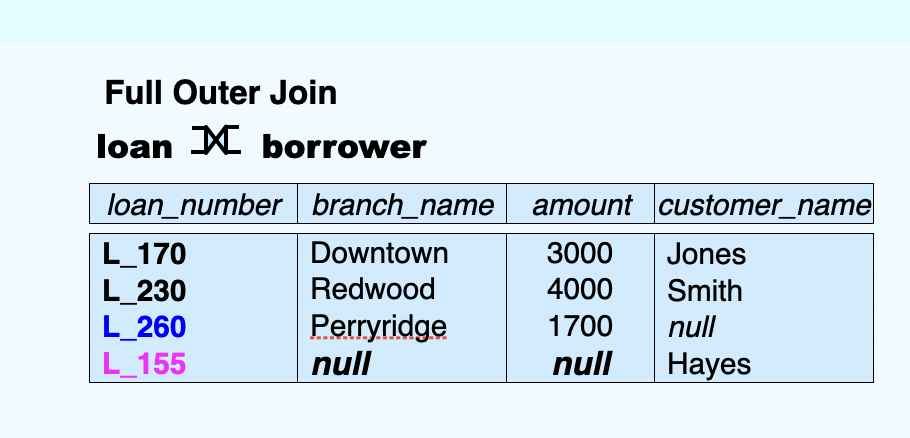
- An extension of the join operation that avoids loss of information.
- Computes the join and then adds tuples form one relation that does not match tuples in the other relation to the result of the join.
- Uses null values:
- null signifies that the value is unknown or does not exist
- All comparisons involving null are (roughly speaking) false by definition.
- Will study precise meaning of comparisons with nulls later
Below I will show several kinds of outer join types: An example:
(4)Null Values
- It is possible for tuples to have a null value, denoted by null, for some of their attributes
- null signifies an unknown value or that a value does NOT exist.
- The result of any arithmetic expression involving null is null.
- Aggregate functions simply ignore null values
- Is an arbitrary decision. Could have returned null as result instead.
- We follow the semantics of SQL in its handling of null values
- For duplicate elimination and grouping, null is treated like any other value, and two nulls are assumed to be the same
- Alternative: assume each null is different from each other
- Both are arbitrary decisions, so we simply follow SQL
unknown
- If false was used instead of unknown, then not (A < 5) would not be equivalent to A >= 5
- Three-valued logic using the truth value unknown:
- OR
- (unknown or true) = true,
- (unknown or false) = unknown,
- (unknown or unknown) = unknown
- AND:
- (true and unknown) = unknown,
- (false and unknown) = false,
- (unknown and unknown) = unknown
- NOT: (not unknown) = unknown
- OR
(5)Modification of the Database
- The content of the database may be modified using the following operations:
- Deletion: \(r \leftarrow r - E\)
- Insersion: \(r \leftarrow r \cup E\)
- Updating: \(r \leftarrow \prod_{F1, F2, ..., Fi}(r)\)